
ChatGPT Companion for Chrome
Overview
The ChatGPT Companion for Chrome is a browser extension designed to streamline access to AI-powered assistance while browsing. It enables users to interact with ChatGPT through multiple interface points, including a popup window, a standalone page, and the browser’s omnibar. The tool aims to reduce friction between research, content creation, and idea generation by allowing users to send selected text directly to ChatGPT as prompts. This functionality is particularly useful for professionals, students, and content creators who rely on fast, context-aware AI support during online workflows.
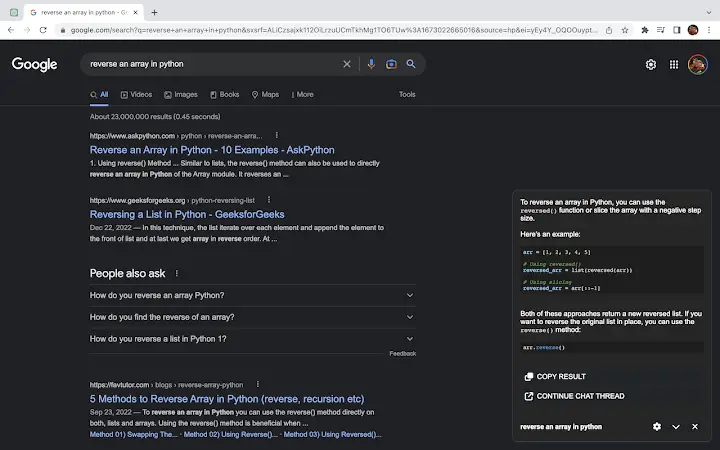
By automatically detecting and integrating with Google search results, the extension enhances the research process by offering instant AI interpretation or summarization of query outcomes. The ability to reuse previously submitted prompts supports consistent and efficient workflows, minimizing repetitive input. The developer, AI Tools Co., has positioned this tool within the growing ecosystem of AI productivity utilities, targeting users who want seamless integration between web browsing and advanced language models.
Real-world applications include drafting emails, summarizing articles, generating code snippets, and refining content on the fly. The extension operates entirely within the browser environment, ensuring that user data remains under their control. No external server access or data collection is mentioned in the provided information, though the developer did not specify privacy practices in detail.
Key Features & Capabilities
- Popup Access to ChatGPT – Open ChatGPT instantly from the browser toolbar, enabling quick interactions without navigating away from the current page.
- Standalone Page Mode – Launch a full-screen ChatGPT interface within the browser, ideal for extended conversations or complex tasks.
- Automatic Google Search Integration – When searching on Google, the extension detects results and offers immediate AI-powered insights or summaries.
- Text Selection Prompting – Highlight any text on a webpage and send it directly to ChatGPT as a prompt, saving time and improving accuracy.
- Omnibar Command Support – Use a custom command in the browser’s address bar to trigger ChatGPT, enabling hands-free access during navigation.
- Reused Prompt History – Access a list of previously submitted prompts, allowing users to refine or reapply earlier queries efficiently.
These features are tailored to reduce workflow interruptions and support rapid ideation. For example, a researcher can highlight a paragraph from a journal article and instantly request a summary or critique. A writer may use the omnibar command to generate a headline based on a topic while browsing news sites. The prompt history feature ensures that users do not need to retype complex instructions, enhancing consistency across tasks.
User Interface, Workflow & Performance
The user interface is designed to integrate seamlessly with the Chrome browser’s existing layout. The popup window appears in a clean, minimal format, focusing on input and response fields without clutter. Navigation is straightforward: users can access the extension via the toolbar icon, omnibar command, or context menu after selecting text. The standalone page mode provides a dedicated workspace with full-screen functionality, suitable for in-depth interactions.
Workflow efficiency is enhanced by the ability to switch between modes based on task complexity. For quick queries, the popup suffices; for detailed work, the standalone page offers better visibility and organization. The extension operates within the browser’s sandboxed environment, which contributes to stability and security. No performance degradation or resource spikes were reported in the provided data.
The developer did not specify resource usage details. However, based on the 2.1 MB installation size, the extension is lightweight and unlikely to impact system performance significantly. General software behavior suggests that background operations are minimal, and CPU or RAM usage remains low during typical use. Stability appears consistent with standard browser extensions, though no real-world testing data was provided.
Compatibility & System Requirements
The ChatGPT Companion for Chrome is compatible with Windows, Mac, and Linux operating systems, making it accessible across major desktop platforms. It is designed specifically for the Chrome browser, meaning it does not support other browsers unless explicitly stated. The software version is 1.2.3, released on July 15, 2024.
The installation size is 2.1 MB, indicating a compact footprint that requires minimal disk space. The developer did not provide detailed hardware requirements, such as minimum RAM or processor specifications. Exact system requirements were not listed, so users should ensure their system meets general Chrome browser standards.
Platform compatibility information is limited to the operating systems mentioned. No information was provided about older versions of Chrome or potential conflicts with other extensions. Users are advised to verify compatibility with their current browser setup before installation.
Pros and Cons
Pros
- Multiple access points: popup, standalone page, and omnibar for flexible usage.
- Seamless integration with Google search results for enhanced research.
- Efficient text selection-to-prompt workflow reduces manual input.
- Reused prompt history improves consistency and saves time.
- Lightweight at 2.1 MB with broad OS support.
Cons
- Requires Chrome browser; no support for other platforms or browsers.
- Exact system requirements were not specified.
- Privacy and data handling practices are not detailed.
- Performance behavior under heavy usage is not documented.
- Only available as a browser extension; no standalone desktop application.
Is the ChatGPT Companion compatible with all browsers?
The extension is designed for Chrome and does not support other browsers based on the provided information.
Is the software free to use?
Yes, the ChatGPT Companion is available at no cost. No subscription or in-app purchases were mentioned.
How often are updates released?
Updates are released as needed. The current version is 1.2.3, released on July 15, 2024. Future update frequency was not specified.
Does the extension collect user data?
The developer did not provide details about data collection or privacy practices. Users should review the extension’s permissions and terms before installation.
Can I use the tool offline?
The extension requires an active internet connection to communicate with ChatGPT. Offline functionality was not mentioned.
Final Thoughts + CTA
The ChatGPT Companion for Chrome delivers a powerful, flexible interface for accessing AI assistance directly from the browser. Its multiple access methods—popup, standalone page, and omnibar—cater to diverse user preferences and workflows. The integration with Google search results and the ability to send selected text as prompts significantly enhance productivity for researchers, writers, and developers.
While the extension is limited to Chrome and lacks detailed system or privacy disclosures, its lightweight design, broad OS compatibility, and efficient feature set make it a valuable tool for AI-driven web tasks. For users seeking a seamless bridge between browsing and AI interaction, this extension stands out as a practical solution.
Download ChatGPT Companion for Chrome now







